
Parking assistant
The concept
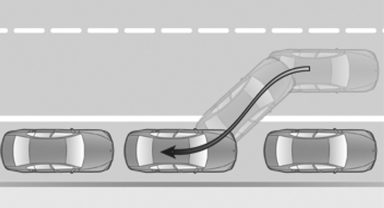
This system assists the driver in parking parallel to the road.
Ultrasound sensors measure parking spaces on both sides of the vehicle.
The parking assistant calculates the best possible parking line and takes control of steering during the parking procedure.
When parking, also take note of the visual and acoustic information issued by the PDC and the parking assistant and accelerate or brake accordingly.
A component of the parking assistant is the PDC Park Distance Control
 Personal responsibility
The parking assistant does not relieve the
driver of responsibility for the vehicle during the
parking procedure.
Watch the parking space and parking procedure closely and intervene if necessary; otherwise, there is the danger of an accident.◀
Requirements
For measuring parking spaces
▷ Maximum speed while driving forward approx.
22 mph/35 km/h.
▷ Maximum distance to row of parked vehicles:
5 ft/1.5 m.
Suitable parking space
▷ Gap between two objects with a minimum
length of approx. 5 ft/1.5 m.
▷ Minimum length: own vehicle length plus
approx. 4 ft/1.2 m.
▷ Minimum depth: approx. 5 ft/1.5 m.
For parking procedure
Closed doors.
Switching on
Using the button
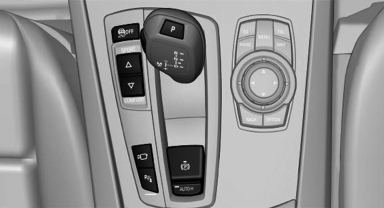
 Press the button.
The LED lights up.
The current status of the parking space search is indicated on the Control Display.
 Parking assistant is activated
automatically.
Parking assistant is activated
automatically.
By engaging reverse
Engage reverse gear or transmission position R.
The current status of the parking space search is indicated on the Control Display.
Activate:  "Parking Assistant"
Select the
symbol in the Control Display.
"Parking Assistant"
Select the
symbol in the Control Display.
Display on the Control Display
System status
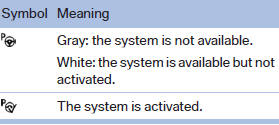
 Gray: the system is not
activated.
Gray: the system is not
activated.
Parking space search.
Blue: the system is activated. A suitable parking space was found.
 The parking procedure is active.
Steering control has been seized.
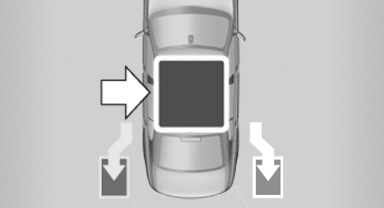
Status of the parking space search
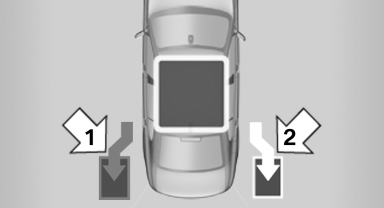
▷ Gray, arrow 1: parking space search.
▷ Blue, arrow 2: parking space is suitable.
The vehicle is parked in the parking space if
the parking procedure is active.
▷ No display: no parking space search.
See also:
Body and safety: The safest BMW 3-Series yet
The new BMW 3-Series offers its passengers exceptional active and passive
safety. Judicious selection of materials, a high-strength structure and an
intelligent lightweight design concept allow th ...
Controls at a glance
Controls
1. Control Display
2. Controller with buttons
You can use the buttons to open the menus directly. The controller can be used to
select the menu items and create settings.
...
System limits
Be alert
Due to system limitations, warnings may
be not be issued at all, or may be issued late or
improperly. Therefore, always be alert and ready
to intervene; otherwise, there is the danger ...