
Side View
The concept
Side View provides an early look at cross traffic at blind driveways and intersections. Road users concealed by obstacles to the left and right of the vehicle can only be detected relatively late from the driver's seat. To improve visibility, two cameras in the front of the vehicle record the traffic situation on each side.
System limits
The cameras capture a maximum range of 330 ft/100 m.
Display
The images from both cameras are shown simultaneously on the Control Display.
 Check the traffic situation as well
Check the traffic situation around the vehicle
on blind driveways and intersections with
your own eyes. Otherwise, an accident could result
from road users or objects located outside
the picture area of the Side View cameras.◀
Switching on/off
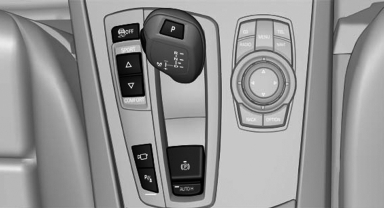
 Press the button.
Automatic deactivation during forward travel
The system switches off when a certain driving distance or speed is exceeded.
Switch the system back on if necessary.
Display on the Control Display
The traffic area to the left and right is displayed on the Control Display.
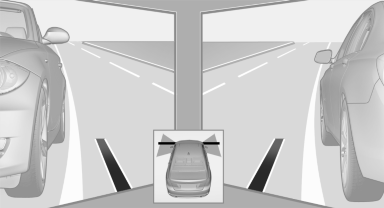
Display on the Control Display
Guidelines at the bottom of the image show the position of the front of the vehicle.
Brightness
With the Side View switched on:
1.  "Brightness"
2. Turn the controller until the desired setting
is reached and press the controller.
Contrast
With the Side View switched on:
1.  "Contrast"
2. Turn the controller until the desired setting
is reached and press the controller.
Cameras
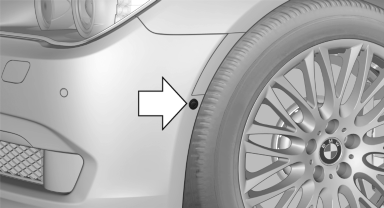
The two camera lenses are located on the sides of the bumper.
The image quality may be impaired by dirt.
Clean the lens
See also:
California Proposition 65 warning
California law requires us to issue the following warning:
Engine exhaust and a wide variety of automobile
components and parts, including components found in the interior furnishings in
a vehic ...
All around the steering wheel
All around the steering wheel
1. Seating comfort functions
Seat, mirror, steering wheel
memory
Active seat
2. Roller sunblinds
3. Rear window safety switch
4. Power windows
5. Exter ...
Activating
Switch position with the
ignition switched
on.
The turning lamps are automatically switched
on depending on the steering angle or the use
of turn signals.
To avoid blinding oncoming traffic ...