
Changing, maintaining, and storing the speed
The rocker switch can be pressed while the system is interrupted to maintain and store the current speed. DSC Dynamic Stability Control is switched on, if necessary.
 Adapting the desired speed
Adapt the desired speed to the road conditions
and be ready to brake at all times; otherwise,
there is the danger of an accident occurring.◀
Speed differences
Great speed differences with vehicles
driving ahead of you, e.g., when rapidly approaching
a truck or when another vehicle
swerves into your own lane, cannot be compensated
for by the system.◀
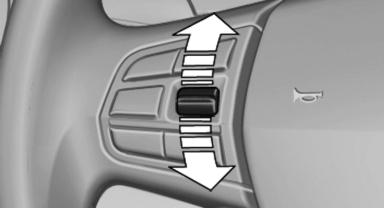
Press the rocker switch up or down repeatedly until the desired speed is set.
If active, the displayed speed is stored and the vehicle reaches the stored speed if the road is clear.
▷ Each time the rocker switch is pressed to the point of resistance, the desired speed increases or decreases by approx. 1 mph/ 1 km/h.
▷ Each time the rocker switch is pressed past the point of resistance, the desired speed increases or decreases by a maximum of 5 mph/10 km/h. Max. adjustable speed:
110 mph/180 km/h.
Hold the rocker switch in position to repeat the action.
See also:
Street does not exist in the destination
city/town
The desired street does not exist in the specified
city/town because it belongs to another part of
the city/town.
1. "Navigation"
2. "Enter address"
3. Select "Street&q ...
Opening/closing the glass sunroof and
sliding visor together
Briefly press the switch twice in
succession in the desired direction
past the resistance point.
The glass sunroof and sliding visor
move together. Pressing the
switch again stops the moti ...
Redialing
General information
The list of dialed numbers in the mobile phone
is transmitted to the vehicle depending on the
mobile phone. The 20 phone numbers dialed
last are displayed. The sorting order ...