
Brightness
Setting the brightness
To set the brightness of the Control Display:
1. "Settings"
2. "Control display"
3. "Brightness"
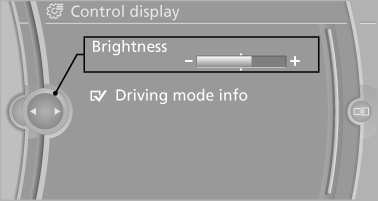
4. Turn the controller until the desired brightness
is set.
5. Press the controller.
The setting is stored for the remote control currently in use.
Depending on the light conditions, the brightness control may not be clearly visible.
See also:
Automatic locking
The setting is stored for the remote control currently
in use.
1. "Settings"
2. "Door locks"
3. Select the desired function:
▷ "Lock if no door is opened"
...
Calling up information on the info
display
Calling up information on the info
display
Press the computer button on the turn signal
lever.
Information is displayed on the info display of the
instrument cluster. ...
Avoid high engine speeds
Use 1st gear to get the vehicle in motion. Beginning
with 2nd gear, accelerate rapidly. When
accelerating, shift up before reaching high engine
speeds.
When you reach the desired speed, shift i ...