
Date
Setting the date
1. "Settings"
2. "Time/Date"
3. "Date:"
4. Turn the controller until the desired day is
displayed.
5. Press the controller.
6. Make the necessary settings for the month
and year.
The date is stored.
Setting the date format
1. "Settings"
2. "Time/Date"
3. "Format:"
4. Select the desired format.
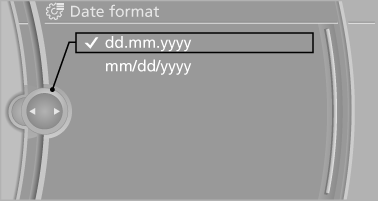
The date format is stored.
See also:
Visual warning
The approach of the vehicle to an object can be
shown on the Control Display.
When the distance to an object is small, a red bar
is shown in front of the vehicle, as it is in the PDC
display.
...
System limits
Changes to the parking space
Changes to the parking space after it was
measured are not taken into account by the system.
Therefore, always be alert and ready to intervene;
otherwise, there is ...
Vehicle Overview
The X6, one of BMW's recent forays into SUV territory, is a tallish fastback
that the company calls a sports activity coupe. With seating for four, it's
basically a midsize SUV with four doors, ex ...