
Hiding Check Control messages
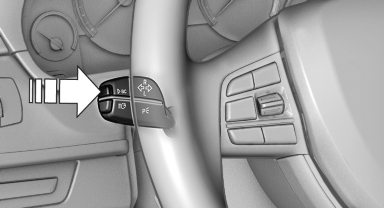
Hiding Check Control messages
Press the computer button on the turn signal lever.
▷ Some Check Control messages are displayed continuously and are not cleared until the malfunction is eliminated. If several malfunctions occur at once, the messages are displayed consecutively.
These messages can be hidden for approx.
8 seconds. After this time, they are displayed
again automatically.
▷ Other Check Control messages are hidden
automatically after approx. 20 seconds.
They are stored and can be displayed again later.
See also:
Bypassing a section of the
route
Calculate a new route for a route section.
1. "Navigation"
2. "Route information"
3. "New route for"
New route for
4. Turn the controller. Enter the number of kilo ...
Removing and inserting
Cargo cover without partition net:
Removing
The cover can be removed to load bulky luggage.
Reach under the cover and turn it upward, arrows.
Pull the cover back horizontally.
Cargo cover ...
Controls
1 Control Display
2 Controller with buttons
The buttons can be used to open the menus
directly. The controller can be used to select
menu items and create the settings. ...