
Opening/closing the sliding visor
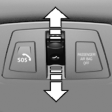 ▷ Press the switch in the
desired
direction to the resistance
point and hold it there.
▷ Press the switch in the
desired
direction to the resistance
point and hold it there.
The sliding visor moves while
the switch is being held.
▷ Press the switch in the desired direction
past the resistance point.
The sliding visor moves automatically.
Pressing the switch again stops the motion.
See also:
Timeshift
Approx. one hour of the program being broadcast
on the channel currently being listened to
is stored in a buffer. Prerequisite: the signal must
be available.
The stored audio track can be playe ...
1 Series M
Rather than the single-turbo setup from the 135i, the 1 Series M gets a
twin-turbo six-cylinder that's good for 335 hp and 332 pounds-feet of torque. In
extreme situations, the 1 Series M can ente ...
Mobility
To ensure that you remain mobile at all times, this
chapter supplies you with important information
on the topics of fuels and lubricants, wheels and
tires, service, maintenance, and Roadside
...