
Setting the voice dialog
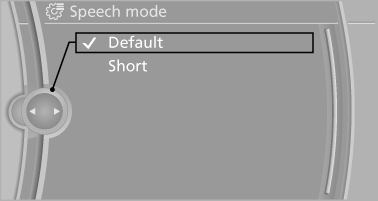
You can set whether the system should use the standard dialog or a shorter version.
In the shorter variant of the voice dialog, the announcements from the system are issued in an abbreviated form.
On the Control Display:
1. "Settings"
2. "Language/Units"
3. "Speech mode:"
4. Select the setting.
See also:
Example: setting the clock
Setting the clock
1. Press the button. The main
menu is
displayed.
2. Turn the controller until "Settings" is highlighted,
and then press the controller.
Turn the controller unti ...
Image on the Control Display
Switching on the rear view camera
using iDrive
With PDC activated:
"Rear view camera"
The image of the rear view camera is displayed.
The setting is stored for the remote control cur ...
Closing
Recessed grips in the interior trim of the trunk
lid make it easier to pull down the lid.
Danger of pinching
Make sure that the closing path of the
trunk lid is clear; otherwise, injuries may ...