
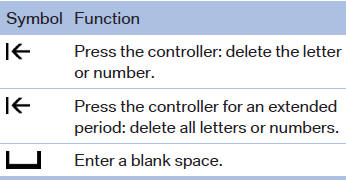
General information
1. Turn the controller: select letters or numbers.
2. Select additional letters or numbers if
needed.
3. "OK": confirm the entry.
See also:
Signaling a turn
Press the lever beyond the resistance point.
To switch off manually, press the lever to the resistance
point.
Unusually rapid flashing of the indicator lamp indicates
that a turn signal bulb has ...
Sport program and manual mode M/S
Activating the sport program
Push the selector lever to the left out of transmission
position D.
DS is displayed in the instrument cluster.
This position is recommended for a performance-
ori ...
View of an opened
When a menu is opened, it generally opens with
the panel that was last selected in that menu. To
display the first panel of a menu:
▷ Move the controller to the left repeatedly
until the ...