
Changing between panels
After a menu item is selected, e.g., "Radio", a new panel is displayed. Panels can overlap.
▷ Move the controller to the left.
The current panel is closed and the previous panel is displayed.
The previous panel is opened again by pressing the BACK button. In this case, the current panel is not closed.
▷ Move the controller to the right.
A new panel is opened on top of the previous display.
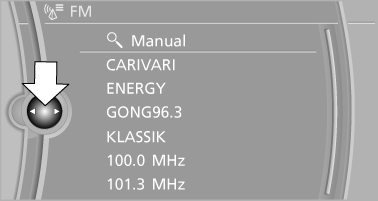
White arrows pointing to the left or right indicate that additional panels can be opened.
See also:
Menu navigation
You can use the thumbwheel and buttons 1 to
navigate through the menus.
▷ Turn the thumbwheel: select a menu item.
▷ Press the arrow buttons: change between
fields.
▷ Press th ...
Time
The time is displayed at the
bottom
of the instrument cluster.
Setting the time and time format ...
Displaying contacts
General information
1. "Office"
2. "Contacts"
All contacts are listed in alphabetical order. Depending
on the number of contacts, an A-Z
search is offered.
A symbol indic ...