
Received calls
Displaying calls
The list of incoming calls on the mobile phone is transmitted to the vehicle, depending on the mobile phone. The 20 telephone calls that were last received are displayed. The sorting order and display of the phone numbers depend on the particular mobile phone.
1. "Telephone".
2. "Received calls"
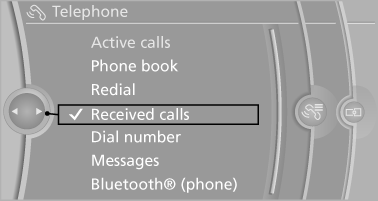
Calling a number from the list
Selecting an entry.
The connection is established.
Deleting a single entry or all entries
The erasure of entries depends on the mobile phone.
1. Highlight the entry.
2. "Options" Open.
3. "Delete entry" or"Delete list"
Saving an entry in the contacts
1. Highlight the entry.
2. "Options" Open.
3. "Store as new contact" or "Add to existing contact".
4. Select the contact, if necessary.
5. Select the type of number: "Home", "Business", "Mobile" or "Other" 6. Complete the entries if necessary.
7. "Store contact"
See also:
Vehicle equipment
All standard, country-specific and optional
equipment that is offered in the model series is
described in this chapter. Therefore, equipment
is also described that is not available in a vehicle,
e ...
Service and Warranty
Information Booklet for US
models and Warranty and
Service Guide Booklet for
Canadian models
Please consult your Service and Warranty Information
Booklet for US models and Warranty and
Service Guide Booklet for Canadian models for
additional information on service requirements.
Mainten ...
Automatic Service Request
The TeleService data necessary for servicing
the vehicle are automatically sent to your service
partner prior to the service deadline. If possible,
the service partner will contact you and a servic ...