
Stored stations
General information
It is possible to store up to 40 stations.
Calling up a station
1. "Radio".
2. "Presets".
3. Select the desired station.
Storing a station
The station currently selected is stored.
1. "Radio".
2. "Presets".
3. "Store station"
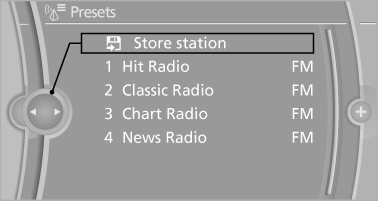
4. Select the desired memory location.
The list of stored stations is stored for the remote control currently in use.
With navigation system and telephone: The stations can also be stored on the programmable memory buttons.
Without navigation system and telephone: On radio station buttons
1. Select the desired station.
2.  Press the desired button for
more
than 2 seconds.
Press the desired button for
more
than 2 seconds.
In order to call up a stored station, briefly press corresponding button.
Deleting a station
1. "Radio".
2. "Presets".
3. Select the desired station.
4. "Options" Open.
5. "Delete entry"
See also:
Disposal
Comply with the relevant environmental
protection regulations when disposing
of coolant and coolant additives. ...
Closing
Danger of pinching
Monitor the closing process and make
sure that the closing path of the window is clear;
otherwise, injuries may result.◀
▷ Pull the switch to the
resistance p ...
At a glance
Contacts can be created and edited. The contacts
from the mobile phone are displayed as
well if this function is supported by the mobile
phone. The addresses can be adopted as destinations
for ...