
Increasing or decreasing vehicle speed
Specify desired speed in the range from approx.
4 mph/6 km/h to approx. 15 mph/25 km/h using the rocker switch of the cruise control on the steering wheel. Vehicle speed can be changed by lightly accelerating.
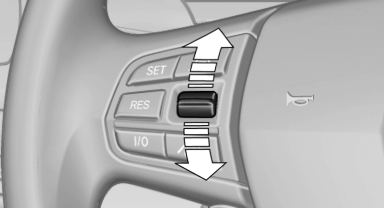
Increasing or decreasing vehicle speed
▷ Press up the rocker switch to the point of resistance: the speed increases gradually.
▷ Press up the rocker switch past the point of resistance: the speed increases while the rocker switch is pressed.
▷ Press down the rocker switch to the point of resistance: the speed decreases gradually.
▷ Press down the rocker switch past the point of resistance: when driving forward, the speed decreases to approx. 6 mph/10 km/h; when reversing, the speed decreases to approx.
4 mph/6 km/h.
See also:
Rain sensor
The concept
The time between wipes is controlled automatically
and depends on the intensity of the rainfall.
The sensor is located on the windshield, directly
in front of the interior rearview m ...
Integrated key
Integrated key
Press the button on the back of the remote control,
arrow 1, and pull out the key, arrow 2.
The integrated key fits the following locks:
▷ Driver's door.
▷ Glove com ...
Controls
Controls
1. Control Display
2. Controller with buttons
The buttons can be used to open the menus
directly. The controller can be used to select
menu items and create the settings.
The button ...