
Traffic Jump
Traffic and weather information for a selected region is broadcast every few minutes.
Selecting a region
1. "Radio".
2. "Satellite radio".
3. "Options" Open.
4. "Set jump".
5. Select the desired region.
The region is stored for the remote control currently in use.
Activating/deactivating the jump
1. "Radio".
2. "Satellite radio".
3.  "Jump to:"
Information for the selected region is broadcast as soon as it is available.
A new panel opens.
Canceling the Traffic Jump: "Cancel".
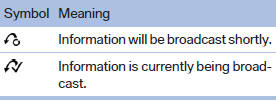
Select one of the symbols to deactivate Traffic Jump.
See also:
Controls
Activating
Switch position
with the ignition switched
on.
The turning lamps are automatically switched
on depending on the steering angle or the use
of turn signals.
Standstill function: to ...
Calls with multiple participants
General information
You can switch between calls or connect two
calls to a single conference call. These functions
must be supported by the mobile phone and
service provider.
Accepting a call ...
Symbols used
Indicates precautions that must be followed
precisely in order to avoid the possibility of personal injury and serious damage
to the vehicle.
Indicates information that will assist you in
gai ...