
Opening the favorites
If an activated favorite is played back, the following message appears for approx. 20 seconds:
"Favorite alert!".
 "Favorites"
Select the symbol while the message is shown.
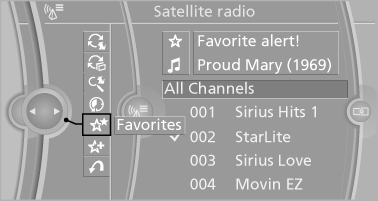
The displayed favorite is played.
If there is no message, the system changes to the My Favorites category. All favorites currently being broadcast can be selected from a list.
See also:
System limits
Sudden tire damage
Sudden serious tire damage caused by
external influences cannot be indicated in advance.◀
A natural, even pressure loss in all four tires cannot
be detected. Therefore, ...
BMW EfficientDynamics: More power, less fuel consumption
With high-performance engines, superior suspension technology and an
extremely torsion-resistant body, the new BMW 3-Series is building on its
position as the sportiest sedan in its segment. It is ...
Special destinations
General information
Even with the most current navigation data, information
regarding particular individual destinations
may have changed. For instance, certain
gas stations may not be operatin ...