
Storing favorites
Up to 30 favorites can be stored in the favorites list. Available favorites are artist, track, game, league, and team.
Storing the artist, track, or game
It is only possible to store favorites that are currently being broadcast. The channel information must be available.
1. "Radio".
2. "Satellite radio".
3. If necessary, open "All channels" or the desired category.
4. Select the desired channel.
5. Press the controller again.
6. Select the artist, track, or game.
Storing the league or team
Leagues or teams can be added to the favorites from a selection list.
1. "Radio".
2. "Satellite radio".
3. "Manage favorites".
4. "Add sports information"
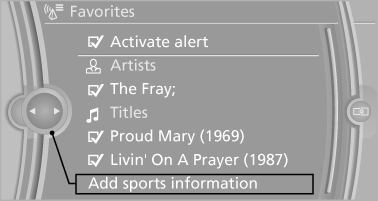
5. Select the league.
6. Select "Add all teams" or the desired team.
See also:
Interior: driver-oriented cockpit, exclusive ambience.
The driver-oriented cockpit layout familiar from BMW models down the years
and a dynamic forward-surging movement define the design of the interior. The
centre section of the instrument panel - in ...
Initiating an Emergency Request
1. Press the cover briefly to open it.
2. Press the SOS button until the LED in the
button lights up.
▷ The LED lights up: an Emergency Request
was initiated.
If the situation allows, w ...
ECO PRO
Consistent tuning to minimize fuel consumption
for maximum range with maximum driving stabilization.
Comfort functions and the engine controller are
adjusted.
The program can be configured to in ...