
Timeshift
Approx. one hour of the program being broadcast on the channel currently being listened to is stored in a buffer. Prerequisite: the signal must be available.
The stored audio track can be played with a delay following the live broadcast. When the buffer is full, the older tracks are overwritten. The buffer is cleared when a new channel is selected.
Opening the timeshift function
1. "Radio".
2. "Satellite radio".
3.  "Replay - Time shift"
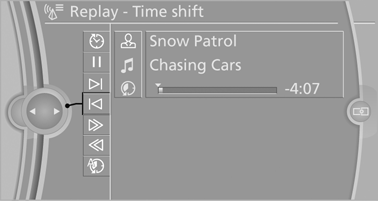
▷ The red arrow shows the current playback position.
▷ The time difference to the live broadcast is displayed next to the buffer bar.
For live transmissions: "live".
Timeshift menu
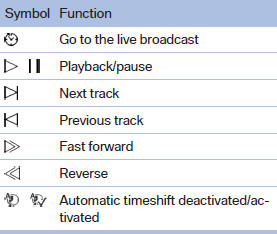
Automatic timeshift
When the function is activated, audio playback is stopped automatically in the event of:
▷ Incoming and outgoing telephone calls.
▷ Activation of the voice activation system.
▷ Muting.
The audio playback then continues with a time delay.
To activate:
1. "Radio".
2. "Satellite radio".
3.  "Replay - Time shift".
4.  "Automatic time shift".
To deactivate:  "Automatic time
shift".
"Automatic time
shift".
See also:
Automatic tailgate operation
Adjusting the opening height
You can set how far the tailgate should open.
Adjusting the opening height
When adjusting the opening height, ensure
that there is a clearance of at least
4 in/10 cm ...
Managing music
Albums
Renaming an album
The name of the album, if available, is automatically
entered when the album is stored. If the
name is not available, it can be changed later if
desired.
1. "CD/M ...
Look well ahead when driving
Avoid unnecessary acceleration and braking.
By maintaining a suitable distance to the vehicle
driving ahead of you.
Driving smoothly and looking ahead reduces
fuel consumption. ...