
Changing the list view
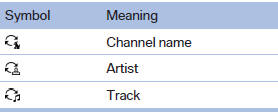
The list view changes every time the first symbol on the navigation bar is pressed.
Information on the channel is displayed.
See also:
Sorting the task list
1. Select the header in the task list.
Sorting the task list
2. Select the sorting criterion:
▷ "Priority (!)"
▷ "Subject"
▷ "Due date" ...
Status field
The following information is displayed in the status
field at the top right:
► Time.
► Current entertainment source.
► Sound output, on/off.
► Wireless network reception ...
New contact
1. "Contacts"
2. "New contact"
3. The entry fields are still filled with the previous
entries: "Delete input fields"
4. Fill in the entry fields: select the symb ...