
Configuring ECO PRO
1. "Settings"
2. "Driving mode"
3. "Configure ECO PRO"
4. Configure the program.
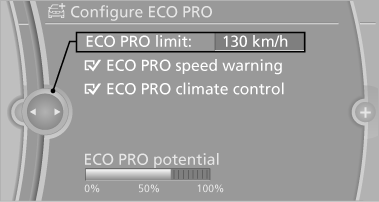
ECO PRO Tip
▷ "ECO PRO limit:":
Set ECO Pro speed at which an ECO PRO
Tip is to be displayed.
▷ "ECO PRO speed warning":
A reminder is displayed if the set ECO PRO
speed is exceeded.
ECO PRO climate control
"ECO PRO climate control"
The climate control is adjusted to be fuel-efficient.
The following settings are optimized:
▷ Cooling or heat output of the automatic climate control ▷ Exterior mirror heating ▷ Seat heating
ECO PRO Potential
The percentage of potential savings that can be achieved with the current configuration is displayed.
See also:
Switching on/off
Switching on/off
Press button 1 on the steering wheel.
▷ On: lane markings 2 are lit.
▷ Off: lane markings 2 go out.
The system can issue warnings at speeds above
approx. 40 mph/65 ...
General information
The interior lamps, footwell lamps, exit lamps,
cargo area lamps and courtesy lamps are controlled
automatically.
The courtesy lamps have LED lights in the door
handles to illuminate the exteri ...
System limits
Check the traffic situation as
well
Check the traffic situation around the vehicle
with your own eyes. Otherwise, an accident
could result from road users or objects located
outside the pict ...