
Switching the high beams on and off manually
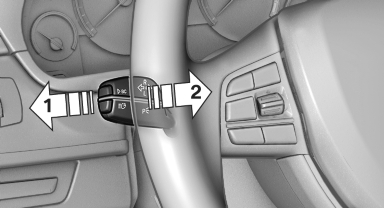
Switching the high beams on and off manually
▷ High beams on, arrow 1.
▷ High beams off/headlamp flasher, arrow 2.
The High-beam Assistant can be switched off when manually adjusting the light. To reactivate the High-beam Assistant, press the button on the turn signal lever.
See also:
Energy recovery
The energy of motion of the vehicle
is converted to electrical energy
while coasting. The vehicle
battery is partially charged and
fuel consumption can be lowered. ...
Front ventilation
Front ventilation
1. Use the thumbwheels to smoothly open and
close the air vents
2. Use the lever to change the direction of the
air flow
Avoiding injury
Do not drop any foreign objects i ...
BMW ConnectedDrive: Intelligent integration provides greater assurance,
comfort and safety
The BMW ConnectedDrive range of technology includes a portfolio of innovative
functions which serve to ensure maximum comfort, infotainment and safety. BMW
ConnectedDrive uses the intelligent link ...