
Time
Setting the time
1. "Settings"
2. "Time/Date"
3. "Time:"
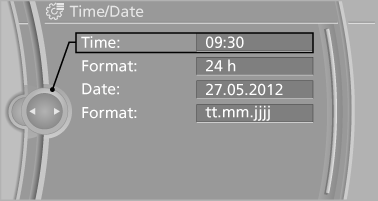
4. Turn the controller until the desired hours
are displayed.
5. Press the controller.
6. Turn the controller until the desired minutes
are displayed.
7. Press the controller.
The time is stored.
Setting the time format
1. "Settings"
2. "Time/Date"
3. "Format:"
4. Select the desired format.
The time format is stored.
See also:
Navigation
This chapter describes how you can enter destinations and specify your route
so that your navigation system guides you reliably to your destination. ...
Rain sensor
The concept
The time between wipes is controlled automatically
and depends on the intensity of the rainfall.
The sensor is located on the windshield, directly
in front of the interior rearview m ...
Shoulder support
Also supports the back in the shoulder area:
▷ Results in a relaxed seating position.
▷ Reduces strain on the shoulder muscles. ...