
Hiding Check Control messages
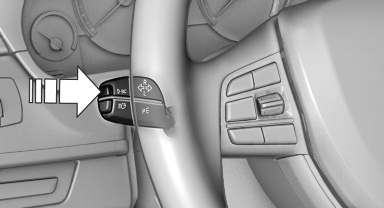
Press the computer button on the turn signal lever.
▷ Some Check Control messages are displayed continuously and are not cleared until the malfunction is eliminated. If several malfunctions occur at once, the messages are displayed consecutively.
These messages can be hidden for approx.
8 seconds. After this time, they are displayed again automatically.
▷ Other Check Control messages are hidden automatically after approx. 20 seconds.
They are stored and can be displayed again later.
See also:
Opening/closing the glass sunroof and sliding visor together
▷ Slide switch back to the resistance
point and hold.
Glass sunroof and sliding visor
open together as long as
the switch is held down.
▷ Press switch back past the resistance po ...
Pressure specifications
The tire inflation pressure table, contains all pressure specifications
for the specified tire sizes at the ambient temperature.
Pressure specifications apply to approved
tire sizes and recommend ...
Received calls
Displaying calls
The 20 calls that were last received are displayed.
1. "Telephone"
2. "Received calls"
Calling a number from the list
Selecting an entry.
The connectio ...