
Changing between panels
After a menu item is selected, e.g., "Radio", a new panel is displayed. Panels can overlap.
▷ Move the controller to the left.
The current panel is closed and the previous panel is displayed.
The previous panel is opened again by pressing the BACK button. In this case, the current panel is not closed.
▷ Move the controller to the right.
A new panel is opened on top of the previous display.
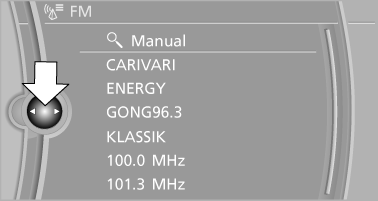
White arrows pointing to the left or right indicate that additional panels can be opened.
See also:
Playing music
Music search
All tracks for which additional information has
been stored can be accessed by the music
search. Tracks without additional information
can be called up via the corresponding album. ...
Tail lamps, bulb replacement
At a glance
At a glance
1 Turn signal
2 Reversing lamp
3 Inside brake lamp
4 Tail lamps
5 Outside brake lamp
Bulb replacement, exterior tail lamps
General information
Follow the General ins ...
Notes
CD/DVD player and changer
Do not remove the cover
BMW CD/DVD players and changers are
officially designated Class 1 laser products. Do
not operate if the cover is damaged; otherwise,
severe e ...