
Controls
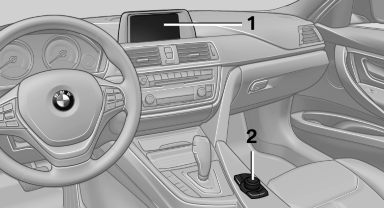
Controls
1 Control Display
2 Controller with buttons
The buttons can be used to open the menus directly. The controller can be used to select menu items and create the settings.
See also:
Switching the system on/off
Press the left or right side of the button
on the CD/DVD player in the rear for the
respective page.
Rear entertainment and screens are switched
on/off.
After switching off the ignition, ...
Reprogramming individual buttons
1. Switch on the ignition.
2. Press and hold the interior rearview mirror
button to be programmed.
3. As soon as the interior rearview mirror LED
starts flashing slowly, hold the hand-held
tra ...
Displays in the instrument cluster
Desired speed
▷ The marking lights up in
green: the system is active.
▷ The marking lights up in orange:
the system has been
interrupted.
▷ The marking does not light up: ...