
All around the center console
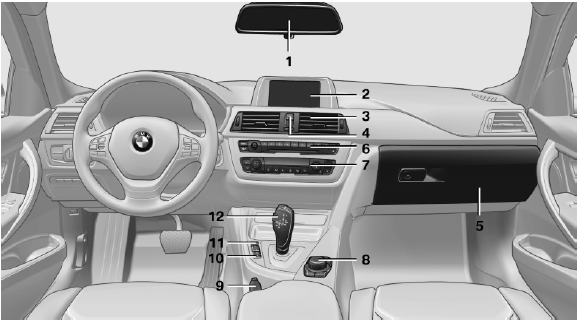
All around the center console
1 Headliner
2 Control Display
3 Ventilation
4
 Hazard warning system
 Central locking system
5 Glove compartment
6 Radio
CD/multimedia
7 Climate control
8 Controller with buttons
9 Parking brake
10
 PDC Park Distance Control
Backup camera
Parking assistant
Surround View
11
 Driving Experience Switch
 DSC Dynamic Stability Control
12 Transmission selector lever
See also:
Warning of people in danger
If the system detects a person in the defined
area in front of the vehicle and if there is the danger
of a collision with this person, a warning
symbol appears in the Control Display and
Hea ...
Vehicle equipment
All standard, country-specific and optional
equipment that is offered in the model series is
described in this chapter. Therefore, equipment
is also described that is not available in a vehicle, ...
Opening the Options menu
Press the button
The "Options" menu is displayed.
The "Options" menu is displayed
Additional options: move the controller to the
right repeatedly until the "Options&qu ...