
Starting BMW Online
1. "BMW Assist" or "ConnectedDrive"
2. "BMW Online"
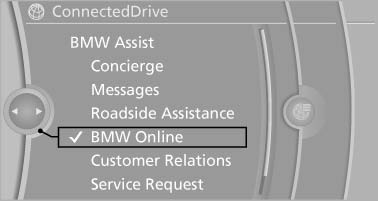
Starting BMW Online
3. If necessary, "OK".
The BMW Online home page is displayed.
See also:
Playback
Filling the CD/DVD* player
Insert the CD/DVD with the printed side up.
Playback begins automatically.
Reading can take a few minutes with compressed
audio files.
Starting playback
A CD/DVD is ...
Connecting jumper cables
1. Fold open the cover of the BMW starting-aid
terminal. To do so, pull the tab.
2. Attach one terminal clamp of the positive
jumper cable to the positive terminal of the
battery, or to the cor ...
Measurement
Measurements are made by ultrasound sensors
in the bumpers.
The range is approx. 6 ft/2 m.
An acoustic warning is first given:
▷ By the front sensors and two rear corner
sensors at approx ...