
New contact
A contact can have up to 8 phone numbers, 2 addresses, 3 e-mail addresses and one Internet address.
1. "Office"
2. "Contacts"
3. Open "Options".
4. "New contact"
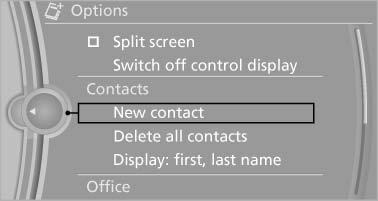
5. The entry fields are still filled with the previous
entries: "Delete input fields"
6. Fill in the entry fields: select the symbol next
to the entry field.
7. Enter the text and assign the contact type.
8. If the vehicle is equipped with a navigation
system: enter the address. Only addresses
contained in the navigation data in the vehicle
can be entered. This ensures that destination
guidance is possible for all addresses.
If necessary, "Accept address".
9. "Store contact in vehicle"
Contact types
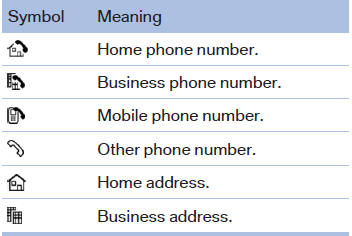
Various contact types can be assigned to phone numbers and addresses.
Specifying the home address
A home address can be stored. It appears at the top of the contact list.
1. "Office"
2. "Contacts"
3. "Home"
4. Create a contact.
5. "Store contact in vehicle"
See also:
Voice operation
Vehicles equipped with the voice activation system:
operation.
Vehicles not equipped with the voice activation
system: depending on the equipment, the mobile
phone can be voice operated as descr ...
Operation
Adjusting the volume
Turn the knob until the desired volume is reached. The setting is stored for
the remote control currently in use.
The vehicle automatically adjusts the volume of the microphon ...
CD/DVD changer
In the glove compartment
In the glove compartment
The BMW CD/DVD changer for six CDs/DVDs is
located in the glove compartment
Controls and displays
Controls and displays
1 Empty CD/DVD comp ...