
Received calls
Displaying calls
The 20 calls that were last received are displayed.
1. "Telephone"
2. "Received calls"
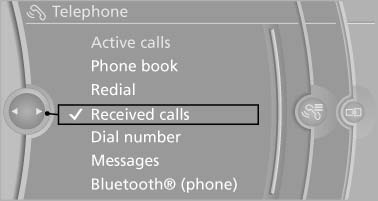
Displaying calls
Calling a number from the list
Selecting an entry.
The connection is established.
Saving an entry in the contacts
1. Highlight the entry.
2. Open "Options".
3. "Store as new contact" or "Add to existing contact"
4. Select  "New
phone number" or contact.
"New
phone number" or contact.
5. Select the type of number: "Home", "Business", "Mobile", or "Other" 6. Complete the entries if necessary.
7. If necessary, "Store contact in vehicle".
See also:
Reassigning individual programs
1. Switch on the ignition.
2. Hold the hand-held transmitter a distance of
approx. 1 to 3 in/2.5 to 8 cm from the memory
buttons.
The required distance depends on the
manual transmitter.
3. H ...
Starting playback
Push the CD/DVD into the drive with the labeled
side facing upward. The CD/DVD is automatically
pulled in.
▷ Playback begins automatically after a few
seconds.
▷ Otherwise: select ...
Tire inflation pressure
Safety information
The tire characteristics and tire inflation pressure
influence the following:
▷ The service life of the tires.
▷ Road safety.
▷ Driving comfort.
Checking th ...