
Phone book
Displays
The phone book accesses the contacts and shows all contacts for which a phone number has been stored. The entries can be selected to make a call.
1. "Telephone"
2. "Phone book"
A symbol indicates the storage location of the contacts.
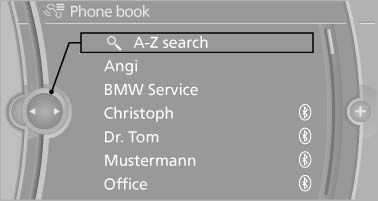
Displays
Calling a contact
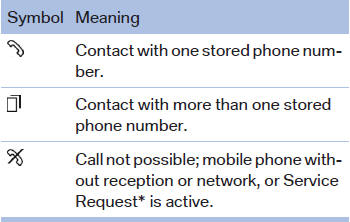
For contacts with one stored phone number: select the required contact. The connection is being established.
For contacts with more than one stored phone number: select the required contact and the phone number. The connection is being established.
Editing a contact
Changing the entries in "Contacts". When a contact is changed, the changes are not stored on the mobile phone. A copy of the entry is stored in the vehicle.
1. Highlight the contact.
2. Open "Options".
3. "Edit entry"
The contact can be edited.
See also:
Oil types
Note
No oil additives
Oil additives may lead to engine damage.
Approved oil types
Your service center can advise you on which engine
oils have been approved by the manufacturer
of your vehicl ...
Date
The date is displayed in the instrument
cluster.
Setting the date and date format. ...
Activating/deactivating the system
manually
Using the button
Press the button.
▷ LED comes on: Auto Start Stop function is
deactivated.
The engine is started during an automatic
engine stop.
The engine can only be stopped or st ...