
Storing
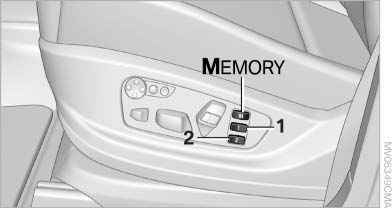
Storing
1. Switch on the radio ready state or the ignition
2. Set the desired seat, exterior mirror and steering wheel positions.
3.  Press the button. The LED in
the
button lights up.
Press the button. The LED in
the
button lights up.
4. Press the desired memory button 1 or 2. The LED goes out.
If the M button is pressed accidentally:
 Press the button again. The LED
goes
out.
Press the button again. The LED
goes
out.
See also:
Setting the voice dialog
You can set whether the system should use the
standard dialog or a shorter version.
In the shorter variant of the voice dialog, the announcements
from the system are issued in an
abbreviated fo ...
BMW X5: rear window wiper
BMW X5: rear window wiper
1. Intermittent wipe
When reverse gear is engaged, the system
switches to continuous operation
2. Cleaning the rear window
Do not use the washing mechanisms
when ...
Audio playback
Selecting the track using the button
Press the button for the appropriate direction
as often as necessary until the
desired track is played back.
Selecting the track using the iDrive
Audio C ...