
Connecting a specific device
If more than one device is detected by the vehicle, the device at the top of the list is connected.
A different device can be connected by selecting it.
1. "Telephone"
2. "Bluetooth® (phone)"
3. Select the device that is to be connected
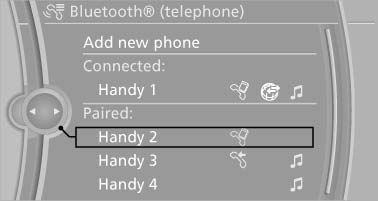
Select the device that is to be connected
The functions that were assigned to the device before unpairing are assigned to the device when it is reconnected. If the device is already connected, these functions are deactivated.
See also:
Safety
Active head restraints, two-row side curtain airbags, front airbags and
side-impact airbags for the front seats are all standard. So is an electronic
stability system, antilock brakes and traction ...
Switching on automatically
With the engine running or the ignition switched
on, shift the selector lever into position R. ...
Special windshield
The windshield is part of the system.
The shape of the windshield makes it possible
to display a precise image.
A film in the windshield prevents double images
from being displayed.
Therefore, ...