
DVD con
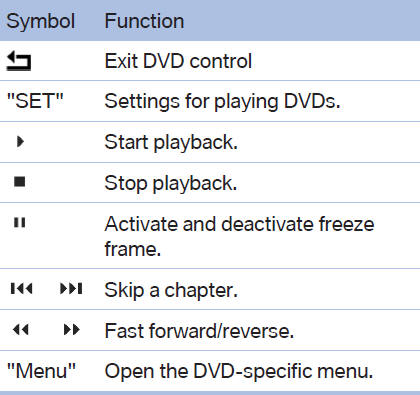
With the DVD control, you can select the title and chapter, open the DVD-specific menu, and operate functions such as Language, Fast forward and Reverse or Freeze frame.
A DVD can briefly deactivate functions of the DVD control, under certain circumstances while the entire DVD is being played. It is not possible to operate the DVD control under these circumstances.
In this case, try to make the selection using the DVD-specific menu.
1.  Press the button on the remote
control
during playback.
Press the button on the remote
control
during playback.
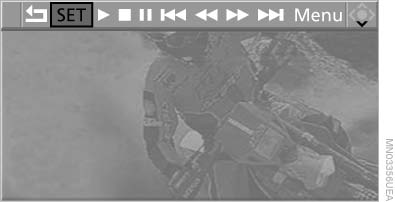
DVD control
2. Press  the
buttons on the remote control
or turn the thumbwheel to select the desired
function.
the
buttons on the remote control
or turn the thumbwheel to select the desired
function.
3.  Press the button.
The DVD control disappears again after a short time if you have not selected a function.
Or:  Press the button on the remote control to
exit the DVD control.
Press the button on the remote control to
exit the DVD control.
See also:
Drive-off assistant
This system supports driving away on gradients.
The parking brake is not required.
1. Hold the vehicle in place with the foot brake.
2. Release the foot brake and drive away without
delay.
After ...
The concept
Dynamic Performance Control optimizes the
handling characteristics of your vehicle when
starting off, cornering, and during evasive maneuvers.
To achieve this, the system variably distributes
t ...
Actions in the event of a flat tire
Normal tires
1. Identify the damaged tire.
Do this by checking the air pressure in all
four tires.
If the tire inflation pressure in all four tires is
correct, the Tire Pressure Monitor may n ...