
Playback
Loading the CD/DVD player
Insert the CD/DVD with the printed side up.
Playback begins automatically.
Reading can take a few minutes with compressed audio files.
Starting playback
A CD/DVD is located in the CD/DVD player or in the CD/DVD changer.
1. "CD/Multimedia"
2. "CD/DVD"
3. Select the desired CD or DVD.
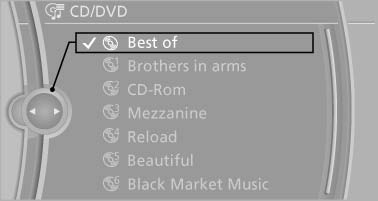
Select the desired CD or DVD.
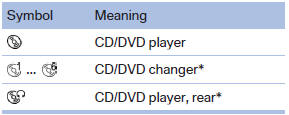
Playable formats
▷ DVD: DVD-ROM, DVD-R, DVD+R, DVDRW, DVD+RW, DVD-R DL, DVD+R DL, DVD audio (video part only), DVD video.
▷ CD: CD-ROM, CD-R, CD-RW, CD-DA, VCD, SVCD.
▷ Compressed audio files: MP3, WMA, AAC, M4A.
See also:
Integrated Owner's Manual in
the vehicle
The integrated Owner's Manual can be displayed
on the Control Display. The equipment
and functions that are in the vehicle are described
therein. ...
AUTO program
Press the button.
Air volume, air distribution, and
temperature are controlled automatically.
Depending on the selected temperature, AUTO
intensity, and outside influences, the air is directed ...
Note
Manufacturer's information for LATCH
child restraint fixing systems
To mount and use the LATCH child restraint fixing
systems, observe the operating and safety
information from the system man ...