
Welcome lamps
When parking the vehicle, leave the switch in
position  or
or
 the parking and interior
lamps light up briefly when the vehicle is unlocked.
the parking and interior
lamps light up briefly when the vehicle is unlocked.
Activating/deactivating
1. "Settings"
2. "Lighting"
3. "Welcome light"
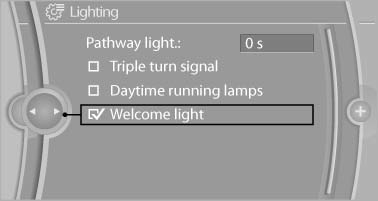
The setting is stored for the remote control currently in use.
See also:
Activating a list and creating the
setting
Press a button on the right side of the steering
wheel or turn the thumbwheel to activate the required
list.
Create the setting using the thumbwheel. ...
2013 BMW 6 Series Gran Coupe: First Look
Competes with: Mercedes-Benz CLS-Class, Audi A7
Looks like: A more animated 5 Series ... with a 7 Series price tag
Drivetrain: 315-hp, twin-turbocharged 3.0-liter inline-six-cylinder; 445-hp,
tw ...
Remove attached partsfollowing use
Remove auxiliary mirrors, roof or rear luggage
racks which are no longer required following
use.
Attached parts on the vehicle impair the aerodynamics
and increase the fuel consumption. ...