
Changing the list view
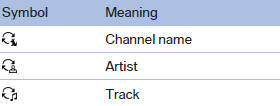
The list view changes every time the first symbol on the navigation bar is pressed.
Information on the channel is displayed
See also:
2012 BMW 3 Series: Up Close
Of all BMW's cars, the 3 Series is the one that somehow escaped being hit by
the Chris Bangle ugly stick, so I didn't go to the redesigned compact sedan's
North American debut looking for sweet re ...
Range
After the reserve range is
reached:
▷ A Check Control message is
displayed briefly.
▷ The remaining range is
shown on the computer.
▷ When a dynamic driving style is used, ...
Storing a station
1. "Radio"
2. "FM" or "AM"
3. Highlight the desired station.
4. Press the controller for an extended period.
5. Select the desired memory location.
The stations ar ...