
Switching the high beams on and off manually
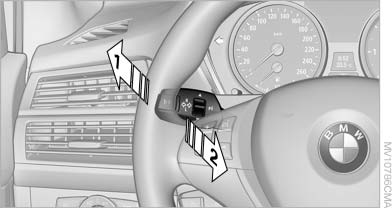
Switching the high beams on and off manually
▷ High beams on, arrow 1.
▷ High beams off/headlamp flasher, arrow 2.
To reactivate the High-beam Assistant, briefly push the turn indicator lever toward the high beams.
See also:
Tasks
Displaying the task list
Display tasks that are due within the next
90 days.
1. "Office".
2. "Tasks"
Sorting the task list
1. Select the header in the task list.
2. Selec ...
The concept
The Check Control system monitors functions
in the vehicle and notifies you of malfunctions in
the monitored systems.
A Check Control message is displayed as a
combination of indicator or warni ...
Coolant
Coolant consists of half water and half additive. Not all commercially available
additives are suitable for your BMW. Ask your BMW center for suitable additives.
Only use suitable additives; other ...