
ECO PRO
Consistent tuning to minimize fuel consumption for maximum range with maximum driving stabilization.
Comfort functions and the engine controller are adjusted.
The program can be configured to individual specifications.
Activating ECO PRO

Press button repeatedly until ECO PRO is displayed in the instrument cluster.
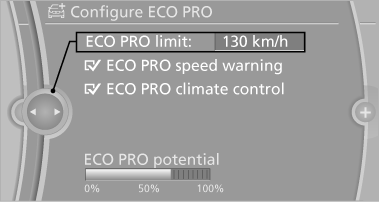
Configuring ECO PRO
1. Activate ECO PRO.
2. "Configure ECO PRO"
or
1. "Settings"
2. "Driving mode"
3. "Configure ECO PRO"
Make the desired settings.
See also:
Onboard vehicle tool kit
The onboard vehicle tool kit is located on the
right side in the cargo area in a storage compartment.
Open the cover. ...
Functional readiness of the airbag system
When the ignition is switch on, the warning
lamp in the instrument cluster lights
up briefly and thereby indicates the operational
readiness of the entire airbag system
and the belt tensione ...
Pressure specifications
The tables below provide all the correct inflation
pressures for the specified tire sizes at ambient
temperature.
The inflation pressures apply to the tire sizes
approved and tire brands recomm ...