
Controls
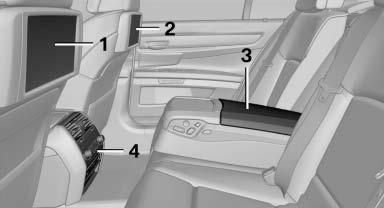
1 Screen, left
2 Screen, right
3 Center armrest, remote control
4 CD/DVD player
See also:
LATCH child restraint fixing system
LATCH: Lower Anchors and Tethers for CHildren.
Coupe: rear seats
The anchor points for the lower LATCH anchors are located behind the labeled
protective caps.
Convertible: rear seats
To inst ...
Safety belt reminder for the driver's and front passenger seat
The indicator lamp flashes or
lights up
and a signal sounds. Make sure that the
safety belts are positioned correctly.
The safety belt reminder is active at speeds
above approx. 5 mph/8 km/h ...
Eight-speed automatic transmission: sporty, fuel-efficient, and unique in a
compact car
The standard six-speed manual petrol and diesel versions of the new BMW
1-Series offer efficient power transmission and precise gear changes.
The BMW 1-Series is also the only compact car also ava ...