
Daytime running lights
With the ignition switched on, the daytime running
lights light up in position 0,  or
or
 .
.
After the ignition is switched off, the parking
lamps light up in position  .
.
Activating/deactivating
1. "Settings"
2. "Lighting"
3. "Daytime running lamps"
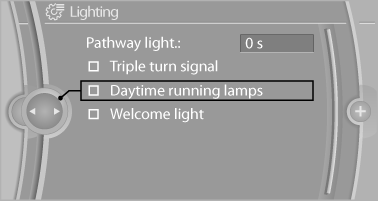
The setting is stored for the remote control currently in use.
See also:
Managing music
Albums
Renaming an album
The name of the album, if available, is automatically
entered when the album is stored. If the
name is not available, it can be changed later if
desired.
1. "CD/ ...
Upholstery material care
Vacuum regularly with a vacuum cleaner.
If they are very dirty, e.g., beverage stains, use a
soft sponge or microfiber cloth with a suitable
interior cleaner.
Clean the upholstery down to the se ...
Storing favorites
Up to 30 favorites can be stored in the favorites
list. Available favorites are artist, track, game,
league, and team.
Storing the artist, track, or game
It is only possible to store favorites t ...