
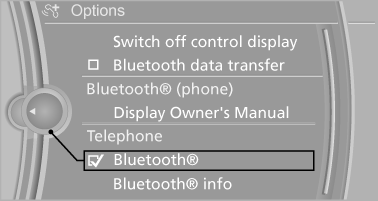
Activating/deactivating Bluetooth
Bluetooth is not permitted everywhere. Comply with all safety guidelines and regulations.
1. "Telephone"
2. Open "Options".
3. "Bluetooth®"
See also:
General information
The engine oil consumption is dependent on the
driving style and driving conditions.
Therefore, check the engine oil level after every
refueling using the electronic engine oil level
check. ...
Starting destination guidance
1. "Navigation"
2. "Last destinations"
3. Select the destination.
4. "Start guidance" ...
Backup camera
The concept
The backup camera provides assistance in parking
and maneuvering backwards. The area behind
the vehicle is shown on the Control Display.
System limits
Check the traffic situation a ...