
Driving Experience Switch
The concept
The Driving Experience Switch can be used to adjust the driving dynamics of the vehicle. For this purpose various programs are available for selection that are activated via the two buttons of the Driving Experience Switch and the DSC OFF-button.
Operating the programs
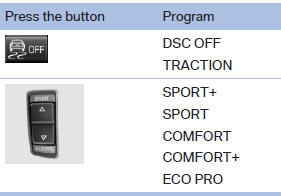
For Dynamic Damper Control, the lower button is labeled with COMFORT.
Automatic program change
The system automatically switches to COMFORT in the following situations:
▷ Failure of Integral Active Steering.
▷ Failure of Dynamic Damping Control.
▷ The vehicle has a flat tire.
See also:
Starting the engine
The engine starts automatically under the following
conditions:
▷ Manual transmission:
The clutch pedal is pressed.
▷ Automatic transmission:
By releasing the brake pedal.
When Auto ...
BMW X5 with BMW Advanced Diesel:
required fuel
Ultra-Low Sulfur Diesel
The engine of your BMW is designed for diesel
with a low sulfur content:
Ultra-low sulfur diesel ASTM D 975-07a.
Only refuel with ultra-low sulfur diesel.
The percentag ...
General information
Overloading the vehicle
To avoid exceeding the approved carrying
capacity of the tires, never overload the vehicle.
Overloading can lead to overheating and increases
the rate at which damage deve ...