
ECO PRO
Consistent tuning to minimize fuel consumption for maximum range with maximum driving stabilization.
Comfort functions and the engine controller are adjusted.
The program can be configured to individual specifications.
Activating ECO PRO
 Press button repeatedly until
ECO PRO
is displayed in the instrument cluster.
Press button repeatedly until
ECO PRO
is displayed in the instrument cluster.
Configuring ECO PRO
1. Activate ECO PRO.
2. "Configure ECO PRO"
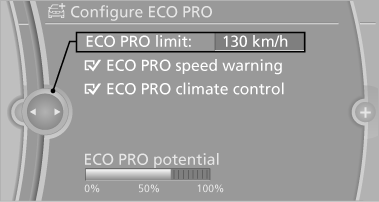
or
1. "Settings"
2. "Driving mode"
3. "Configure ECO PRO"
Make the desired settings.
See also:
Maintaining/storing the speed
Press the button.
When the system is switched on, the
current speed is maintained and stored as the
desired speed.
It is displayed in the speedometer and briefly
displayed in the instrument c ...
At a glance
General information
▷ Display the traffic bulletins from radio stations
that broadcast the TI Traffic Information
of a traffic information service. Information
on traffic obstructions and ...
Displays in the instrument cluster
Indicator lamp
Depending on how the vehicle is
equipped,
the indicator lamp in the instrument
cluster indicates whether the system is
switched on.
Desired speed
► The marking lights up ...