
SPORT
Consistently sporty tuning of the suspension for greater driving agility with maximum driving stabilization.
The program can be configured to individual specifications.
The configuration is stored for the remote control currently in use.
Activating SPORT
 Press the button repeatedly
until
SPORT appears in the tachometer.
Press the button repeatedly
until
SPORT appears in the tachometer.
Configuring SPORT
If the display on the Control Display, is activated, the sport program can be set to individual specifications.
After the sport program is activated, select "Configure SPORT mode" on the displayed panel and configure the program.
Optionally, the sport program can be configured before it is activated:
1. "Settings"
2. "SPORT mode"
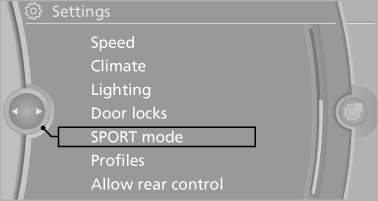
3. Configure the program.
This configuration is retrieved when the sport program is activated.
See also:
Context help - Owner's Manual to thetemporarily selected function
The relevant information can be opened directly.
Opening during operation via iDrive
To move directly from the application on the
Control Display to the options menu:
1. Press the button or move ...
Manual transmission
Switching off the engine
1. With the vehicle at a standstill, press the
Start/Stop button.
2. Shift into first gear or reverse.
3. Set the parking brake. ...
Traffic bulletins on the map
General information
"Traffic conditions/gray map" Active: indication
on the control display is switched to shades of
gray. This enables a better view of the traffic
bulletins. Day/night ...