
BMW Info
General information
Messages from BMW regarding service actions and news from BMW.
Selecting additional functions
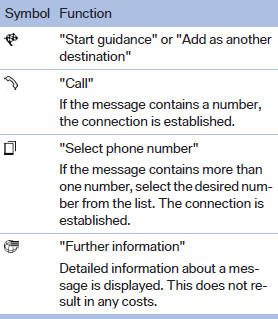
The following functions are available when a message is selected:
See also:
Observe the following when
refueling
When refueling, insert the filler nozzle completely
into the filler pipe. Lifting up the fuel
pump nozzle during refueling causes:
▷ Premature pump shutoff.
▷ Reduced efficiency in t ...
Controls
Activating
Switch position
with the ignition switched
on.
The turning lamps are automatically switched
on depending on the steering angle or the use
of turn signals.
Standstill function: to ...
All around the center console
All around the center console
1. Headliner
2. Control Display
3. Glove compartment
4. Air vent
5. Hazard warning system
Central locking system
6. Radio
CD/Multimedia
7. Automatic climate ...