
Time
Setting the time zone
1. "Settings"
2. "Time/Date"
3. "Time zone"
4. Select the desired time zone.
The time zone is stored.
Setting the time
1. "Settings"
2. "Time/Date"
3. "Time:"
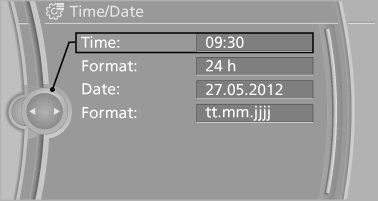
4. Turn the controller until the desired hours
are displayed.
5. Press the controller.
6. Turn the controller until the desired minutes
are displayed.
7. Press the controller.
The time is stored.
Setting the time format
1. "Settings"
2. "Time/Date"
3. "Format:"
4. Select the desired format.
The time format is stored.
See also:
Exterior: Dynamic proportions in perfect balance.
The proportions of the new BMW 5-Series Sedan are defined in archetypal BMW
style by the long wheelbase and hood, short overhangs, aft-set greenhouse, and
the coupe-like flowing roofline. The slig ...
Units of measure
To set the respective units of measure, miles or
km for the odometer and ℃ or ℉ for the external
temperature.
The setting is stored for the remote control currently
in use. ...
Long-term vehicle storage
Your service center can advise you on what to
consider when storing the vehicle for longer
than three months. ...