
Vehicle information
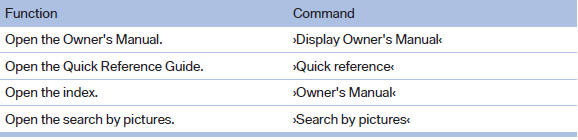
Owner's Manual
Computer

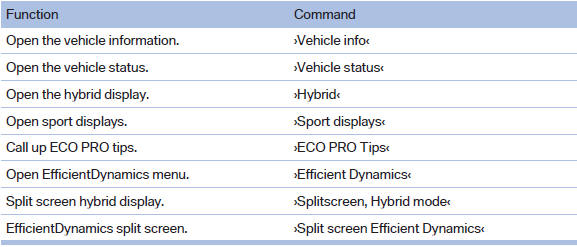
Vehicle
See also:
The new BMW X6: dynamic, supreme, efficient, innovative
With the market launch of the new BMW X6, the combination of supreme
appearance, agile driving properties and hallmark brand efficiency so
characteristic of the Sports Activity Coupé is rai ...
Engine stop
The engine is switched off automatically during
a stop under the following conditions:
Manual transmission:
▷ Neutral is engaged and the clutch pedal is
not pressed.
▷ The driver's ...
Notes
▷ Reception may not be available in some situations,
such as under certain environmental
or topographic conditions. The satellite
radio has no influence on this.
▷ The signal may no ...