
Comparison with ordinary remote control
The functions can be controlled by pressing the buttons of the remote control or Comfort Access.
Unlocking
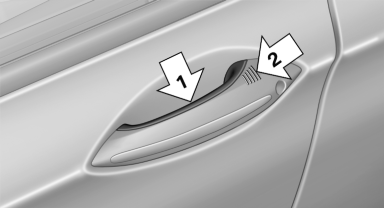
Fully grasp a door handle, arrow 1. This corresponds
to pressing the  button.
Locking
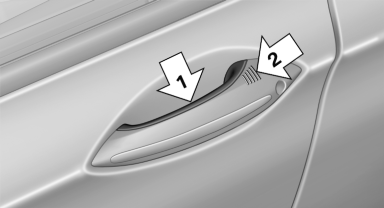
Press the area on the door handle, arrow 2, with your finger for approx. 1 second.
This corresponds to pressing the  button.
To save battery power, ensure that the ignition and all electronic systems and/or power consumers are switched off before locking the vehicle.
Convenient closing
Press the area on the door handle, arrow 2, with the finger and hold it down.
In addition to locking, the windows and the glass sunroof are closed.
 Monitor the closing process
Monitor the closing process to ensure that
no one becomes trapped.◀
Unlocking the trunk lid separately
Press the button on the exterior of the trunk lid
This corresponds to pressing the  button
Do not place the remote control in the
cargo area
Take the remote control with you and do not
leave it in the cargo area; otherwise, the remote
control is locked inside the vehicle when the
trunk lid is closed.◀
See also:
Displaying information on the instrument panel
Displaying information on the
instrument panel
Press the computer button on the turn signal
lever.
Information is displayed in the instrument cluster. ...
Malfunctions
Steering wheel vibration
Frequent activation of the steering wheel vibration
causes the system to overheat.
This causes the lane departure warning to become
deactivated.
Let the system cool and ...
Display on the Control Display
Switching on the backup camera via
iDrive
With PDC activated:
"Rear view camera"
The backup camera image is displayed. The setting
is stored for the remote control currently in
use ...