
Automatic locking
The setting is stored for the remote control currently in use.
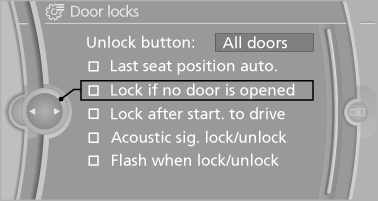
1. "Settings"
2. "Door locks"
3. Select the desired function:
▷ "Lock if no door is opened"
The vehicle locks automatically after a
short period of time if a door is not
opened.
▷ "Lock after start. to drive"
The vehicle locks automatically after
you drive away.
The vehicle locks automatically after
you drive away
See also:
The concept
Dynamic Performance Control optimizes the
handling characteristics of your vehicle when
starting off, cornering, and during evasive maneuvers.
To achieve this, the system variably distributes
t ...
Issuing a warning
If the vehicle begins leaving the lane and a lane
marking has been detected, the steering wheel
begins vibrating.
If the turn signal is set before the lane is
changed, a warning is not issued.
...
Fuel tank capacity
Approx. 22.5 US gallons/85 liters, including the
reserve capacity of approx. 2.1 US gallons/8 liters.
X5 xDrive50i/X6 xDrive50i: reserve capacity of
approx. 3.2 gallons/12 liters.
Refuel promp ...