
Display
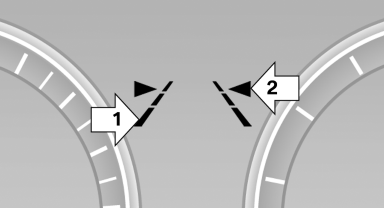 Display
▷ Lines, arrow 1: the system is activated.
▷ Arrows, arrow 2: at least one lane marking was detected and warnings can be issued.
See also:
Mounts for the lower LATCH anchors
Correctly engage the lower LATCH anchors
Make sure that the lower LATCH anchors have
properly engaged and that the child restraint fixing
system is resting snugly against the backrest;
otherwi ...
My contacts
General information
List of all contacts stored in the vehicle.
Displaying contacts
1. "Contacts"
2. "My contacts"
All contacts are listed in alphabetical order. Depending ...
Applying your current speed as the limit
1. "Settings"
2. "Speed"
3. "Select current speed"
The system adopts your current speed as the
limit. ...