
Welcome lamps
When parking the vehicle, leave the switch in
position  or
or
 : the parking and interior
lamps light up briefly when the vehicle is unlocked.
: the parking and interior
lamps light up briefly when the vehicle is unlocked.
Activating/deactivating
1. "Settings"
2. "Lighting"
3. "Welcome light"
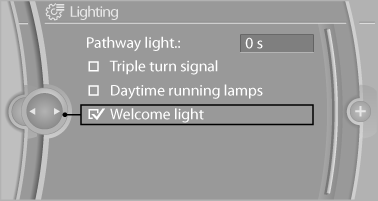
The setting is stored for the remote control currently in use.
See also:
Storing a channel
1. "Radio"
2. "Satellite radio"
3. Select "All channels" or a desired category.
4. Select the desired channel.
5. Press the controller a ...
Tilt
Three different tilt positions are available.
▷ Forward: pull the top edge of the head restraint
forward, arrow 1.
▷ Back: press the button, arrow 2. The head
restraint folds as fa ...
Audio playback
Selecting a track using the buttonPress the
button for the appropriate direction as often as
necessary until the desired track is reached.
Selecting a track using iDriveAudio CDs
1. " ...